
Designing a single-plate connection
A single-plate connection (shear tab) is a plate shop-welded to the support and bolted or welded to the beam web. This page also describes the editor workflow and the loads, bolts, copes and auto-design that the simple shear connection types share.
Choosing the connection type #
Select New connection… in a project's menu. The wizard's first step, Connection type, groups the types:
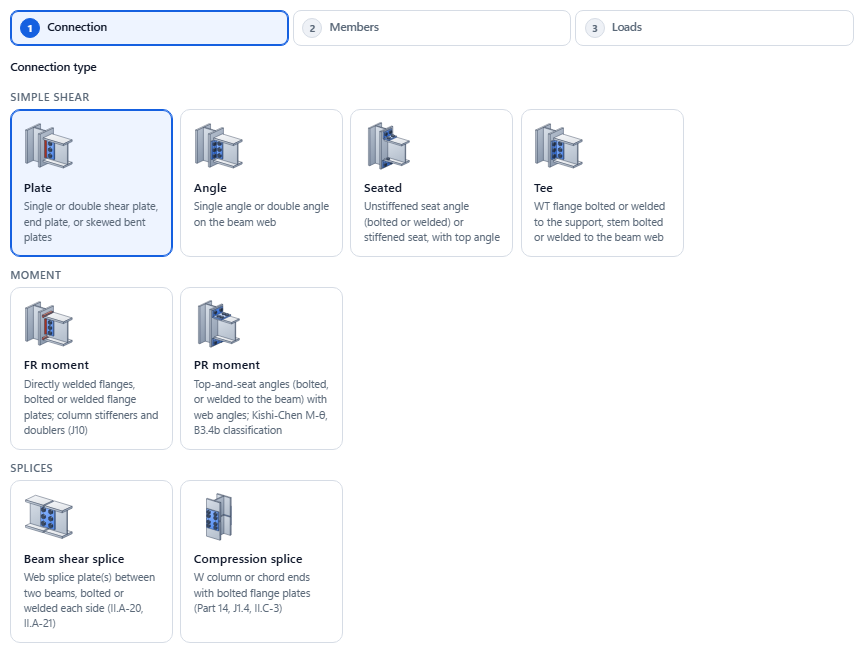
| Group | Type | Mark | Page |
|---|---|---|---|
| Simple shear | Plate, then Plate type: Single plate (shear tab, conventional or extended, or all-welded plate) or Double plate | ST- | this page |
| Plate, then Plate type: End plate (shear end plate, shop-welded to the beam end, bolted to the support) | EP- | Shear end plate | |
| Plate, then Plate type: Skewed bent plate (skewed beam to a girder web) | SK- | Skewed bent plate | |
| Angle, then Angle type: Single angle (bolted to the support, bolted or welded to the beam web) | SA- | Single angle | |
| Angle, then Angle type: Double angle (all-bolted, bolted / welded or all-welded) | DA- | Double angle | |
| Seated: unstiffened (bolted or welded) or stiffened seat, with a top angle | SE- | Seated | |
| Tee: shear tee, WT flange to the support, stem to the beam web | TE- | Shear tee | |
| Moment | FR moment: directly welded flanges, or bolted or welded flange plates; column stiffeners and doublers | MC- | FR moment |
| Column bases | Base plate: column base plate on a pier or footing, with anchor rods | BP- | Base plate |
- Select the type card. Its tooltip gives the short description. Plate and Angle cover several types: their first option row, Plate type (Single plate, Double plate, End plate, Skewed bent plate) or Angle type (Single angle, Double angle), picks the type. Outside the wizard (file tree, editor, reports, batch) each type keeps its own name, for example Shear end plate or Double angle.
- Select the Joint type (not for FR moment): Beam to column flange, Beam to column web, Beam to girder web or Beam to HSS column. A type that cannot use a joint does not offer it, for example a single angle on an HSS column or a seat on a girder web.
- Select the Configuration card of the type. Cards that cannot be built on the chosen joint are greyed out, with the reason in the tooltip.
- Continue with Members and Loads, as described in Projects and connections.
Every option card shows a small picture of the choice (plate type, joint, configuration, member or layout); only method choices, such as the instantaneous-center or elastic method of a bolt or weld group, have none.
Switching type in the wizard keeps the joint, the members and the loads entered so far, and starts the rest from that type's defaults (and the project defaults for that type). Base plate opens its own wizard (column, pier, rods). The editor, the drawings, the checks, the report, the drawing sheet, batch design, compare, templates and project defaults work for every type.
The editor workflow #
The editor designs the connection live. Every change re-runs the full design, about a second after you stop typing, and updates the status, drawings and checks.
- Set up. Choose LRFD or ASD and US or Metric in the toolbar.
- Configuration. Choose the configuration and, for Weld / Bolt, the procedure.
- Loads. Enter the loads.
- Members. Pick the beam and the support.
- Details. Set the bolts, the plate, copes and welds. Start from the defaults; ILX flags what needs to change.
- Fix and finish. Read the status bar and fix what fails (see Checks and compliance). Use Auto-design to let ILX search for a design.
- Produce the outputs. Create the report and drawing sheet.
The sections below follow the order of the input panel.
Choosing the configuration #
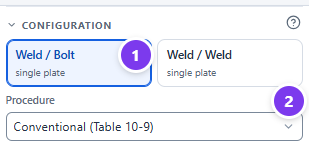
- Select one of the two configuration buttons. The first word is the support side, the second the beam side.
- For Weld / Bolt, choose the Procedure.
| Configuration | Element | Support side | Beam side |
|---|---|---|---|
| Weld / Bolt | single plate (shear tab) | shop-welded, both sides of the plate (or one side, see One-sided support welds) | bolted |
| Weld / Weld | single plate | welded | welded to the web (C-shape, vertical or top and bottom) |
In the wizard, Shear tab and Extended shear tab are Weld / Bolt with the conventional or extended procedure, and All-welded plate is Weld / Weld.
Single angles (an angle bolted to the support) are a connection type of their own; see Designing a single-angle connection.
Conventional or extended (Weld / Bolt) #
| Conventional (Table 10-9) | Extended | |
|---|---|---|
| Basis | Manual Part 10, Table 10-9 as corrected by Muir and Thornton (2011) | Muir and Hewitt (2009), Manual Part 10 |
| Bolts | 2 to 12 rows, one vertical row, s = 3 in. | Any number of rows, up to 3 vertical rows |
| Holes | STD or SSL horizontal only | Any hole type |
| Distance a | a ≤ 3½ in. | Any |
| Eccentricity | Per Table 10-9 (a/2 or a) | Carried by the beam side, the support side or both |
| Plate thickness | tmax by Table 10-9 | tmax by Mmax (with the Muir and Hewitt exemption), plate buckling, stabilizer requirement |
| Edge distance | Leh ≥ 2d on the plate and beam web | Only part of the tmax exemption |
Use the extended procedure when the plate must reach past a column flange into a column web, or past a girder flange, or when the conventional limits cannot be met.
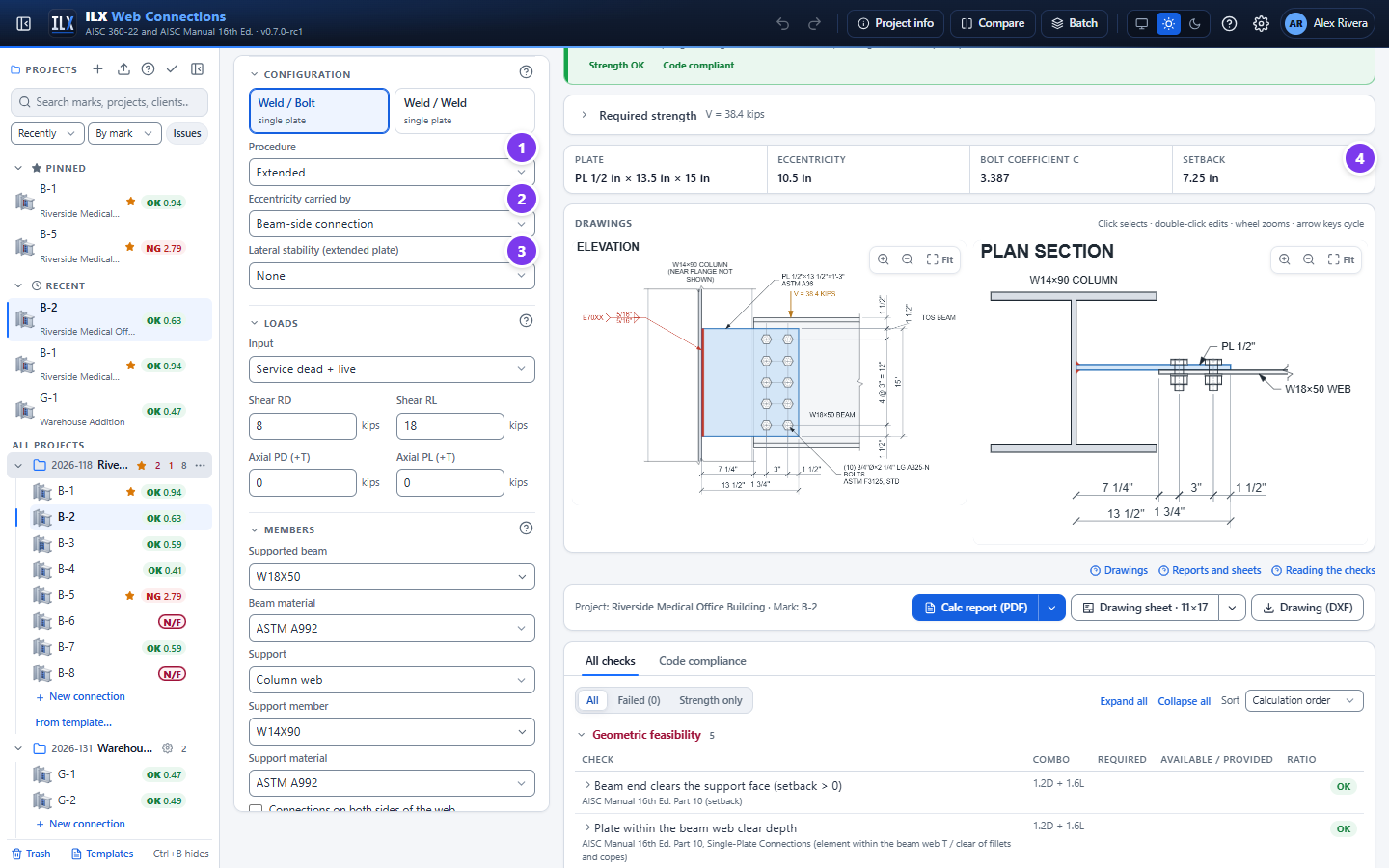
- Procedure: Extended.
- Eccentricity carried by: Beam-side connection (the usual assumption), Support-side connection or Both (conservative). This field also appears for the Weld / Weld configuration.
- Lateral stability (extended plate): None, Top flange restrained, Both flanges restrained or Stabilizer plates. This feeds the stabilizer requirement of the extended procedure.
- Beam end braced (Spec. Appendix 6.3). Ticked (default): plate flexure in Manual Eq. 10-8 uses Cb = 1.84, which the Manual allows only when the beam end is braced per Spec. Appendix 6, Section 6.3. Cleared: the Manual gives no Cb, so ILX shows Cb, plate flexure with the beam end not braced, your input (default 1.0, Spec. F1: a cantilever with an unbraced free end). The report reads "Cb = 1.00 (engineer input; beam end not braced per App. 6.3)" and the input table lists it. ILX also adds a recommendation quoting the Manual (design check 5): for unbraced beams the plate strength and the beam's lateral-torsional buckling strength interact (Cheng and Yura 1988), and ILX does not check that interaction. The report states which Cb was used and why. Conventional procedure: the setting applies only when there is axial load (Manual Part 12, p. 12-7, ties Cb = 1.84 to a braced beam end for single plates under shear and axial force); with shear only the conventional plate keeps Cb = 1.84 (Design Example II.A-17B).
- The key geometry strip shows the resulting plate, eccentricity, bolt coefficient C and setback.
Double plate #
A double plate puts one plate on each face of the beam web. Each plate is welded to the support with fillets on both of its faces, and the bolts pass through plate, beam web and plate, so they are in double shear.
- In the wizard, under Plates, choose Double plate. In the editor, set Plates to Double plate in the Configuration section. The configuration must be Weld / Bolt.
- Fit-up tolerance: the clear gap between the plates is the beam web thickness plus this tolerance (default 1/16 in. in total). A filler, if entered, is added to the gap.
- A double plate cannot be used on an HSS wall, with a one-sided support weld or with a welded beam side. The editor removes the HSS wall from the support list and tells you why.
The AISC Manual has no table or procedure for double plates. ILX uses the eccentric design of the extended single plate, and the report states this design basis:
| Item | Double-plate design basis |
|---|---|
| Bolts | Double shear (two shear planes). Bearing and tearout on the beam web for the full force and on each plate for half. The bolt group carries the full eccentricity, from the weld line to the bolt-group centroid (instantaneous center method). |
| Not used | The Table 10-9 conventional shortcuts and the tp ≤ d/2 + 1/16 (tmax) ductility rule. The stiffer double plate needs the eccentric design. |
| Plates | Each plate takes half the force: shear yielding and rupture, block shear, flexural yielding and rupture with the shear interaction, buckling and lateral stability, at the bolt line and at the support face. |
| Welds to the support | Fillets on both faces of each plate, designed for strength for half the force with the eccentric moment. The (5/8) tp rule is not applied. |
| Support and beam | The full force: support shear rupture over the combined weld groups, web punching and yield line over both plates, beam web shear, block shear and coped-beam checks. |
The checks of each plate end in "(each plate, R/2)". Four detailing items are reported for a double plate:
- Gap between the plates: the tw + tolerance gap, and a note to shim when the gap is larger.
- Inside fillets: the two inside fillets must fit in the gap (2w ≤ gap) and must be reachable for welding. Confirm the access with the fabricator.
- Beam end clears the inside fillets: the setback must be larger than the weld size.
- Erection (a note, not a warning): the plates project past the beam end, so the bottom flange may land on them as the beam is lowered. The beam can often be worked into place. If not, cope the bottom flange over the plates, slide the beam in along its axis, or ship one plate loose and field-weld it. The note gives the cope length needed.
The drawings show both plates: the elevation calls out "2 PL", the plan section shows the plates on both faces of the web with the bolts through all three plies, and a Section A-A (on screen and in the report) shows the plates, the gap and the welds on both faces of each plate.
Members and supports #
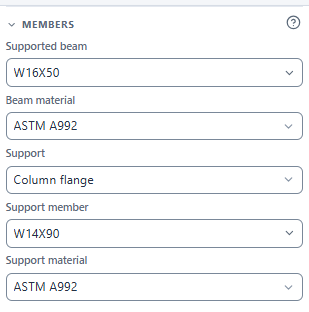
- Supported beam. Type to search the AISC W shapes (
w16x50,W 16 X 50andW16×50all work). Recently used shapes are listed first. In metric, the metric designations are shown. - Beam material: ASTM A992, A572 Gr. 50, A36, A1085 and so on.
- Support:
- Column flange;
- Column web, drawn with the flanges hidden;
- Girder web, drawn as the girder cross-section;
- HSS column wall, welded configurations only: a plate on the face, a through plate, or a round HSS (see HSS columns).
- Support member and Support material. For an HSS wall, choose the HSS shape and an HSS material (A500 Gr. C rectangular or round, A1085, A53 Gr. B), and the Connected HSS face where offered.
When you change Support, ILX keeps the input valid and tells you what it changed in a notification, as the new-connection wizard does:
- To HSS column wall: a W-shape member becomes an HSS8X8X1/2 in A500 Gr. C (rectangular).
- From HSS to a column or girder: the HSS becomes a W14X90 (column) or W24X68 (girder), and an HSS material becomes A992.
- Between a column and a girder: the member changes only while it is still the other type's default (W14X90 or W24X68).
- Round HSS: picking a round HSS member switches A500 Gr. C rectangular to round, and back.
- Girder TOS − beam TOS (+ = beam lower), girder supports only. ILX checks that the beam's top flange clears the girder flange and fillet. If it does not, it proposes a cope as a suggested fix.
- Connections on both sides of the web, for welded connections to a column web or girder web. Tick it when another connection frames into the other face. ILX then uses half the web thickness for this connection (Manual Eq. 9-6 becomes 6.19 D/Fu).
- Connection near the column end, column web or column flange. Cleared (default): the connection is not near the column end, the base case of the Manual and the Specification. Ticked: enter Column end to the connection force.
- Column web: when the distance is less than √(8wab/(a + b)), ILX halves the Eq. 9-45 yield-line strength (Manual p. 9-18).
- Column flange with an axial force: column web local yielding uses Eq. J10-3 (2.5k + lb) when the distance is ≤ d, and web crippling uses Eqs. J10-5a/b when it is < d/2 (AISC 360-22 J10.2, J10.3). Otherwise Eqs. J10-2 and J10-4.
- The report shows the limit, the distance and which equation was used, and the input table lists the column-end condition. The 85 % rule of Manual p. 9-17 (yield line noncritical when the load spans more than 85 % of the web width) is applied to column webs only.
HSS columns: face plate, through plate and round HSS #
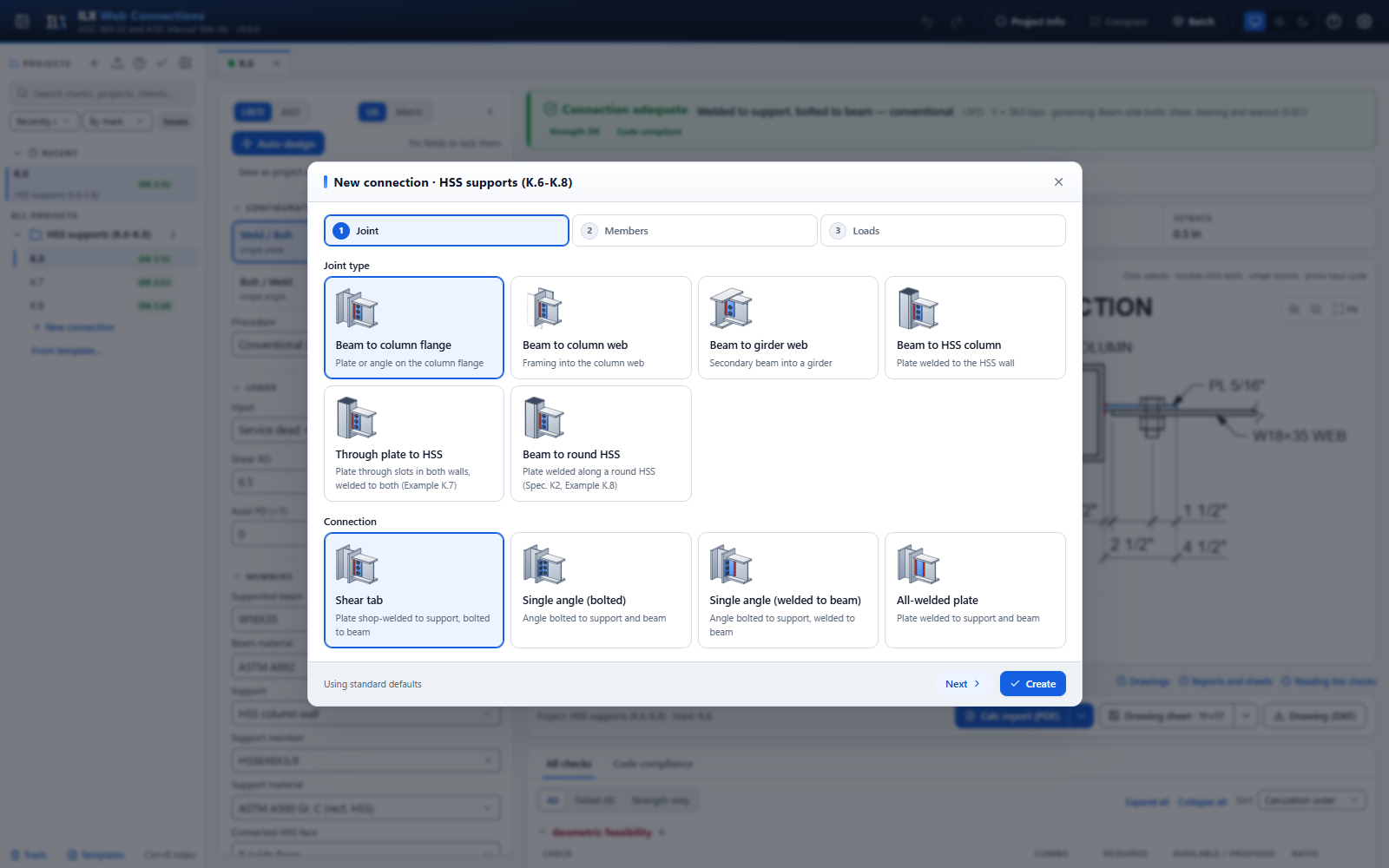
An HSS column takes a welded plate (Weld / Bolt or Weld / Weld). The wizard offers three HSS joint types, and the editor reaches the same three through Support, Support member and HSS connection:
| Joint type | How to get it in the editor | Checks added for the HSS (AISC Design Example) |
|---|---|---|
| Beam to HSS column: plate welded to one face of a rectangular HSS | Support HSS column wall, a rectangular member, HSS connection: Plate welded to the HSS face | b/t ≤ 1.40√(E/Fy) (advisory); tp ≤ Fu t / Fyp (advisory: earlier Manuals; AISC 360-22 Commentary K2.3 says it was removed from the Specification); punching shear Ru e ≤ φ Fu t lp² / 5 (Manual Eq. 10-10, e = HSS face to the bolt group); tmin = 3.09 D/Fu and HSS shear rupture along the welds; wall plastification when there is axial load or the wall is slender (K.6) |
| Through plate to HSS: the plate passes through slots in both walls and is welded to both | Same, with HSS connection: Through plate (both walls) | The beam side is a single plate. The near-wall welds and the HSS wall take R (B + a) / B, where B is the HSS dimension the plate crosses (moments about the far wall). ILX checks the weld size, HSS shear yielding and HSS shear rupture at that reaction, and, under axial load, the yield lines of both walls. The face-plate punching and tmin rules do not apply. There are notes on the slot size (tp + 1/16 in.) and on the cost of through plates (K.7) |
| Beam to round HSS: plate welded along a round HSS | Pick a round member, for example HSS8.625X0.500. The grade becomes A500 Gr. C (round). | Table K2.1A limits: D/t ≤ 0.11E/Fy, D/t ≤ 50 under axial load, Fy ≤ 52 ksi and Fy/Fu ≤ 0.8 (A500 Gr. C is accepted). Plastification Rn = 5.5 Fy t² (1 + 0.25 lb/D) Qf (Eq. K2-2a) under axial load, with Mn = 0.8 lb Rn. A note gives the minimum distance from the plate to the HSS end, D (1.25 − β/2) (K.8) |
- Connected HSS face picks the face of width B or H on a rectangular tube. For a through plate, the plate crosses the other dimension.
- A through plate needs a rectangular HSS. If you pick a round member while a through plate is selected, ILX switches back to a plate welded to the wall and says so.
- Qf = 1.0 throughout, because the HSS axial stress is not an input. Check a column in heavy compression separately.
- A500 Gr. C round HSS uses Fy = 50 ksi, as in ASTM A500-21, Manual Table 2-4 and Design Example K.8.
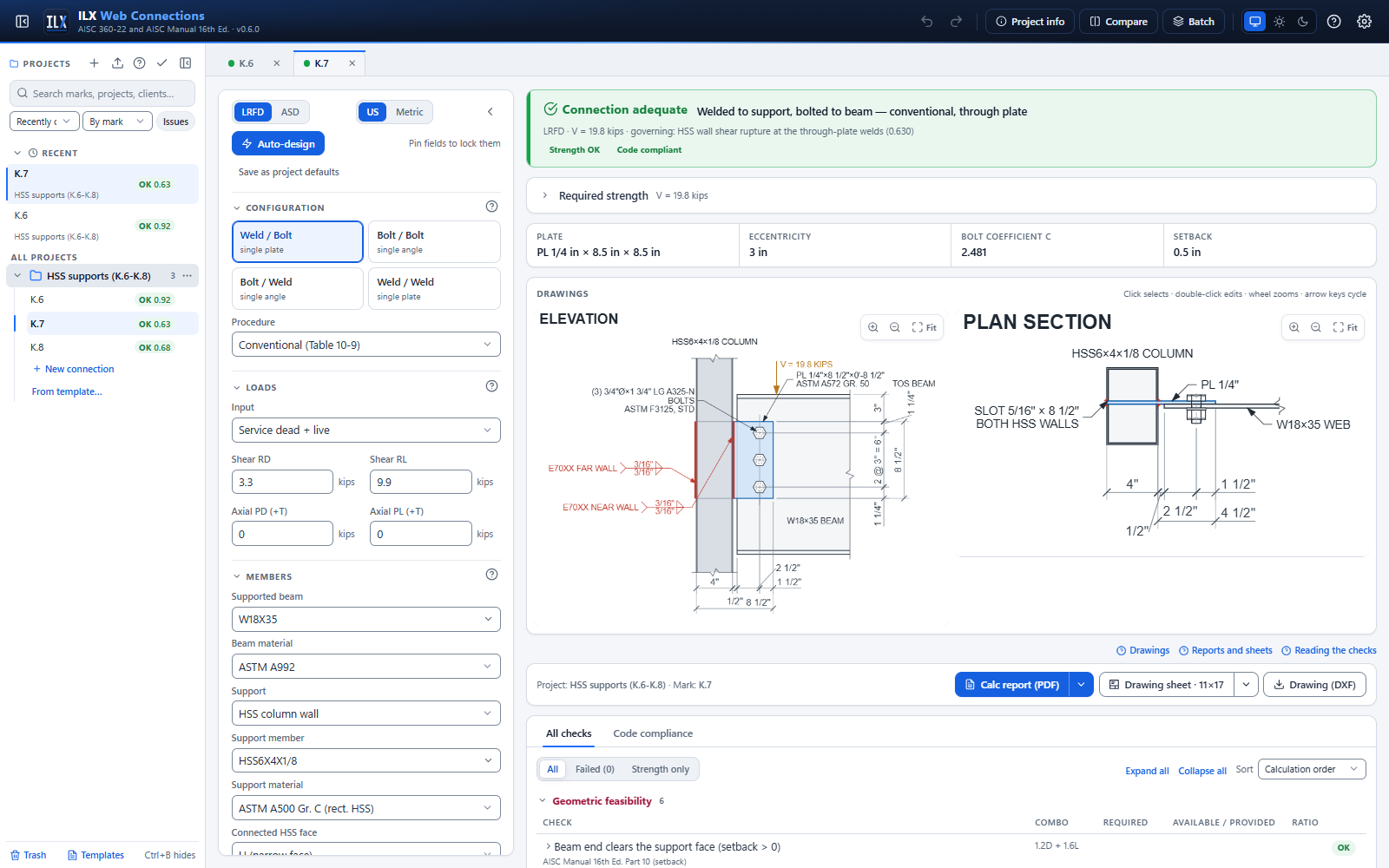
In the drawings, the part of a through plate inside the tube is drawn hidden in the elevation. The near-wall and far-wall welds each have their own symbol (NEAR WALL, FAR WALL). The plan section shows the plate running through both walls, with a fillet on each wall and a SLOT … BOTH HSS WALLS callout. A round HSS is drawn in plan as a circle section with its centerlines.
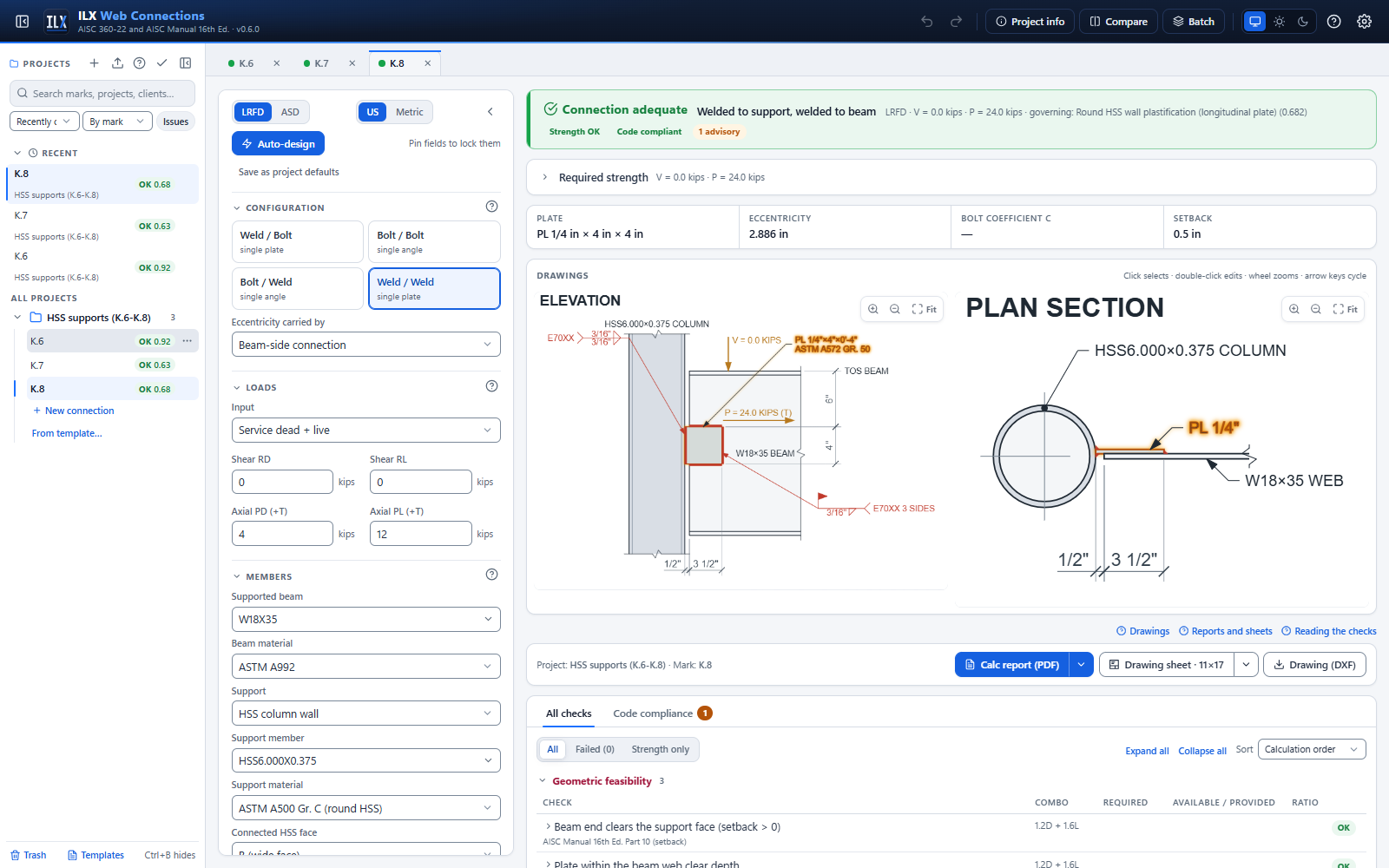
All three joint types are reproduced end to end from AISC Design Examples K.6, K.7 and K.8, in LRFD and ASD, on the Verification page.
Loads and load combinations #
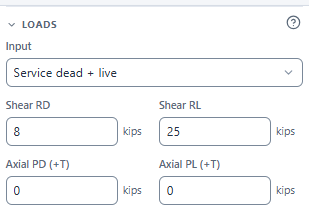
Choose how you enter the loads with Input in the Loads section. Axial loads are positive in tension (+T). The resulting required strength is shown in the Required strength card above the drawings; open it to see the combination worked out.
| Input | Enter | Combinations used |
|---|---|---|
| Service dead + live (default) | Shear RD, RL; axial PD, PL | LRFD: 1.2D + 1.6L and 1.4D. ASD: D + L. |
| Service components → ASCE 7 combinations | D, L, Lr, S, W and E, each as shear R and axial P | Every ASCE 7-22 LRFD (2.3) or ASD (2.4) combination; the envelope governs |
| Required strength (Ru, Pu) | The factored shear and axial (Ra, Pa in ASD) | None (used as entered) |
| Factored load cases (table) | Named cases, each with V and P | Each case is checked; the envelope governs |

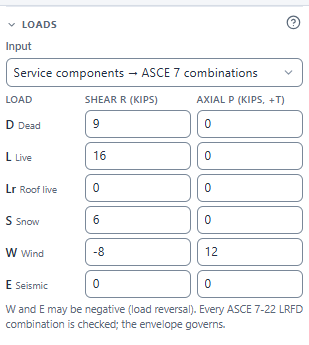
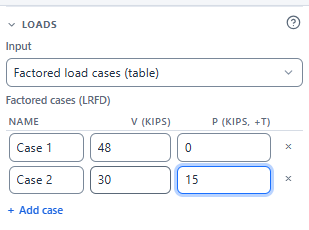
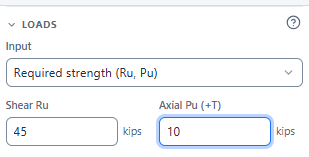
With ASCE 7 combinations or load cases
- Combination table. A Load combinations table under the output bar lists every combination with its V, P, ratio and status, and marks the one that governs. See Load combinations in the results.
- Reversal. W and E may be negative to model load reversal. A combination with net compression is checked as compression, with the effective length factor K (plate in compression), which defaults to 1.2.
- Combo column. Each check shows the combination that governs it in the Combo column.
Axial load
Axial tension adds these checks:
- combined tension and shear on the bolts (J3.7);
- the plate in tension and block shear (U and L shapes);
- the beam in tension (D2/D3);
- the interaction equations of Manual Part 12.
Compression adds plate compression with Lc = K a, and the column-web checks. K (plate in compression) appears when the net axial load is compressive.
The wizard's loads step offers only service D + L and required strength. Use the editor for the other modes.
Bolts and holes #
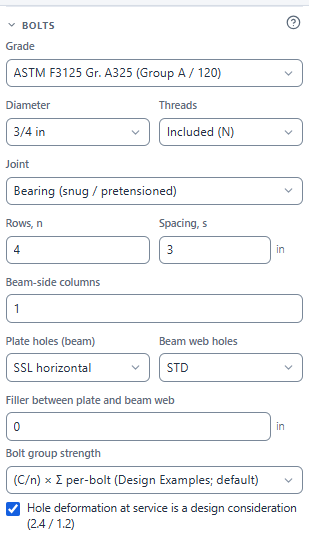
| Field | Options and notes |
|---|---|
| Grade | ASTM F3125 Gr. A325 and F1852 (Group A / 120), Gr. A490 and F2280 (Group B / 150), F3043 / F3111 Gr. 2 (Group C / 200), A307 Gr. A, and F1554 Gr. 36 / 55 / 105 or A36 threaded rod |
| Diameter | 1/2 in. to 1-1/2 in. (Group C: the sizes the standard lists) |
| Threads | Included (N) or Excluded (X). A307 is N only. |
| Joint | Bearing (snug-tight), Bearing, pretensioned or Slip-critical (see Bolt rules for every type) |
| Surface (slip-critical) | Class A (μ = 0.30) or Class B (μ = 0.50) |
| Number of fillers (slip-critical) | 0 to 4, for the hf factor |
| Rows, n and Spacing, s | The vertical bolt rows and their pitch |
| Beam-side columns and Gage | 1 in the conventional procedure; up to 3 in the extended procedure |
| Plate holes (beam), Beam web holes | STD, OVS, SSL horizontal, SSL vertical, LSL horizontal, LSL vertical. The conventional procedure allows STD and SSL horizontal only. |
| Filler between plate and beam web | Applies the AISC 360 J5.2 bolt-shear reduction when thicker than 1/4 in. |
| Bolt group strength | See below |
| Hole deformation at service is a design consideration | Ticked: bearing 2.4 d t Fu and tearout 1.2 lc t Fu. Cleared: 3.0 and 1.5 (J3.11). |
"Horizontal" and "vertical" give the slot direction on the drawing. Under vertical shear, a horizontal slot is transverse to the load.
Slip-critical joints. ILX checks slip resistance with Du = 1.13, hf from the number of fillers, and φ (or Ω) by hole type per J3.9. It also checks bearing at the strength load. Oversized holes, and slots parallel to the load, require slip-critical bolts. ILX flags them in the code-compliance list if the joint is bearing-type.
Bolt group strength
| Option | Strength of the eccentric group | When to use it |
|---|---|---|
| (C/n) × Σ per-bolt (Design Examples; default) | Each bolt takes the least of shear, bearing and tearout; the sum is multiplied by C/n | The method of AISC Design Examples v16 II.A-17A and II.A-18 |
| C × weakest bolt (Muir & Thornton; conservative) | C times the strength of the weakest bolt | The papers' method; conservative |
| C·rnv shear + Σ bearing/tearout (split) | Bolt shear as C rnv, bearing and tearout summed concentrically | Matches some commercial programs; not a Manual method |
C comes from a general instantaneous-center solution (Manual Part 7) at the true load angle, verified against Tables 7-6 and 7-7. Tearout uses lc measured along the line of action of the resultant (Design Example II.A-1B).
Plate and geometry #
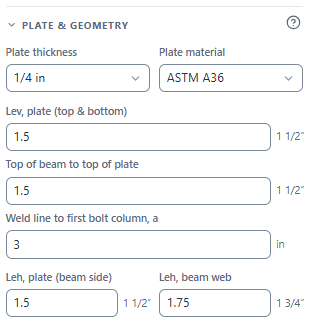
| Field | Meaning |
|---|---|
| Plate thickness, Plate material | 3/16 in. to 1-1/4 in.; A36, A572 Gr. 50 and so on |
| Lev, plate (top & bottom) | Vertical edge distance at the top and bottom bolts. With bolts, the plate depth follows from n, s and Lev. |
| Plate depth, L | Weld / Weld only, where there are no bolts |
| Top of beam to top of plate | Sets where the plate sits on the web; it must clear the flange, fillet and any cope |
| Weld line to first bolt column, a | The distance a of Manual Part 10 |
| Leh, plate (beam side), Leh, beam web | Horizontal edge distances on the plate and the beam web |
| Beam setback (welded beam side) | The gap between the support face and the beam end |
| Plate lap on beam web | Weld / Weld: how far the plate overlaps the beam web |
The setback and plate width follow from a, Leh and the configuration, and are shown in the key-geometry strip under the status bar.
Beam copes #
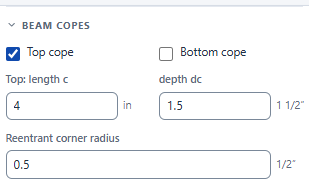
- Tick Top cope, Bottom cope or both.
- Enter each cope's length c and depth dc.
- Enter the Reentrant corner radius. AISC 360-22 M2.2 (thermal cutting) requires a curved transition at reentrant corners; the field's hint and the check both cite it. (J1.6 covers weld access holes, not cope radii.) ILX checks:
- that the radius is at least 3/8 in. (the M2.2 User Note);
- that the radius fits within the cope;
- with Cyclic loading ticked, the Appendix 3 radius, and the fatigue stress range at the cope corner (Table A-3.1 Case 1.3); see Fatigue (Appendix 3).
Single copes are checked by Dowswell (2018), the method of the 16th Ed. Manual. Double copes are checked by Dowswell and Whyte (2014), Manual Eqs. 9-21 and 9-22.
The coped section is also checked for shear yielding, shear rupture and block shear. Hot-dip galvanized and Unpainted weathering steel add the related cope and preheat notes.
Welds to the support and the beam #
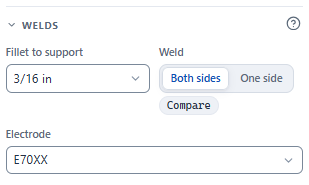
| Field | Meaning |
|---|---|
| Fillet to support | The fillet weld size at the support. ILX checks w ≥ (5/8) tp for ductility, the minimum and maximum size, the minimum length, the base metal (tmin = 3.09 D/Fu per weld line, Manual Eq. 9-6) and support shear rupture along the welds. |
| Weld (support) | Both sides (default) or One side of the plate. See below. |
| Fillet to beam web | The fillet at the beam (Weld / Weld). |
| Weld shape | C-shape, Vertical or Top & bottom (welded beam side). Eccentric weld groups use the instantaneous-center method of Manual Part 8. |
| Lap weld | Plate edges (default: fillets along the plate edges on the near face of the web) or + Beam end (adds the fillet along the beam end on the far face of the plate, in the same weld group). Weld / Weld only. |
| Electrode | E70XX or E80XX |
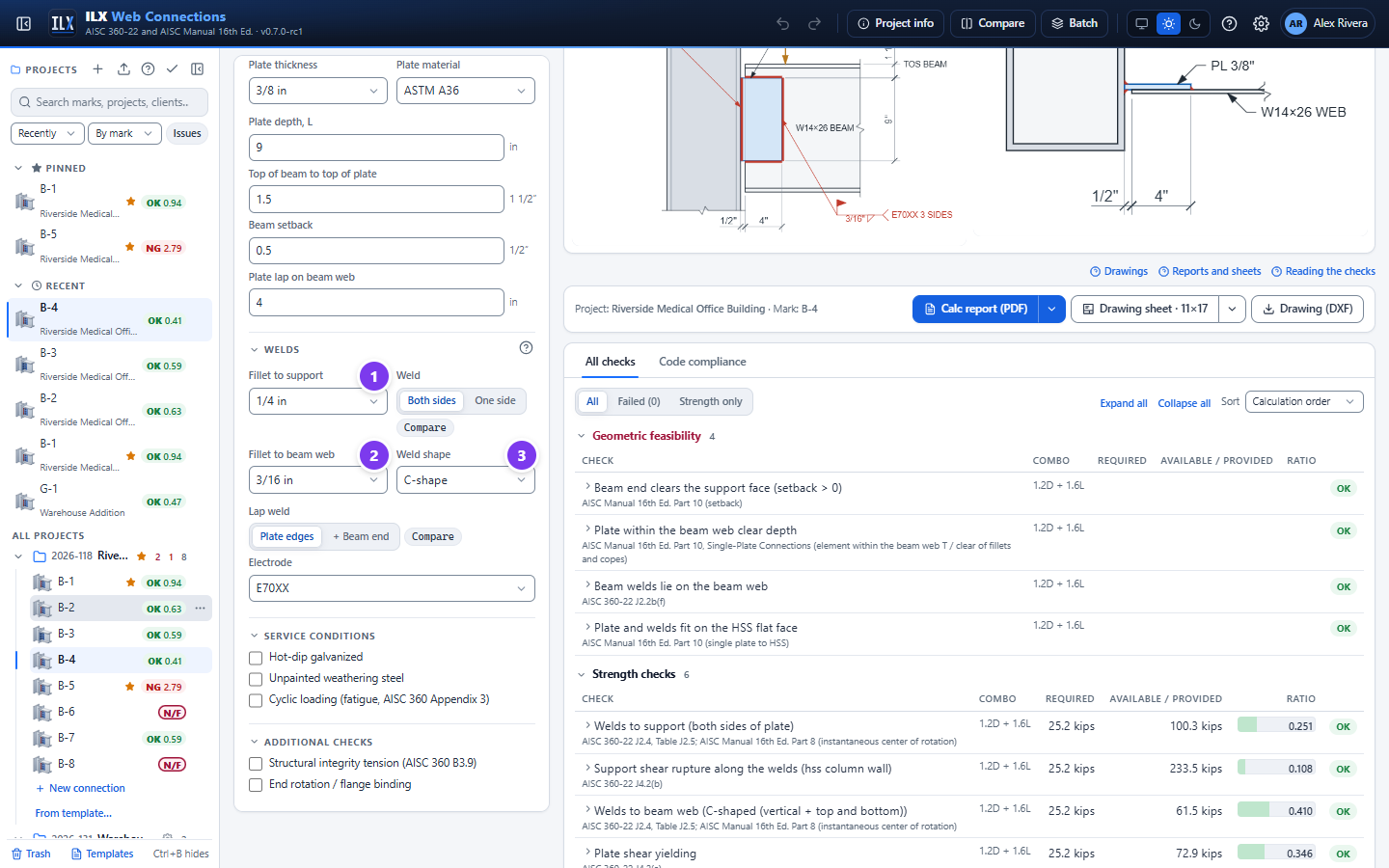
- Fillet to support.
- Fillet to beam web.
- Weld shape. The beam-side weld symbol on the drawing reads, for example, 3 SIDES for a C-shape.
One-sided support welds #
Weld sets whether the plate is welded to the support on both faces or on one face only. Compare next to it designs the other option and shows both governing ratios, for example both: 0.72 OK · one: 1.31 NG.
With One side, ILX:
- checks one fillet line instead of two, with kds = 1.0 (AISC 360-22 J2.4, "all other conditions");
- treats the weld as an eccentric weld group (IC method, Manual Part 8) with an out-of-plane eccentricity tp/2 + w/3, combined with any in-plane eccentricity, even in the conventional procedure. AISC publishes no formula for this; it is ILX's application of the Part 8 method;
- shows w ≥ 2 × (5/8) tp as an advisory, not a failure. This is ILX's derivation from the Manual's both-sides 5/8 tp rule;
- fails the connection when it carries axial tension or the B3.9 structural-integrity tension, because tension across a one-sided fillet is not permitted (Manual Part 8, Spec Commentary J2.2b);
- adds an advisory that the Manual Part 10 procedures assume both faces are welded;
- uses tp + w as the plate footprint for the web yield-line, punching and HSS checks.
The weld symbol is drawn on the arrow side only, and the plan section shows one fillet. With a vertical-only lap weld, axial tension and Plate edges, the check on the lapped ends (J2.2b(f)) fails and suggests + Beam end.
Skewed plate and sloped beam #
The Skew and slope section covers the two non-rectangular cases in Manual Part 10, "Non-Rectangular Simple Shear Connections" (pp. 10-86 to 10-95).
Skewed single plate #
A skewed single plate is welded to the support at the beam's skew angle (Manual Fig. 10-38). It is available for a single plate welded to the support on both faces and bolted to the beam. The Manual says it is designed like a square single plate (p. 10-90), so every single-plate check still runs. The skew changes the welds to the support and adds the checks below.
| Input | Default | Meaning |
|---|---|---|
| Skew of the plate from square | 0° | 0 to 45°. 0 is the square plate. |
| Plate end at the support | Square edge | Square edge is Fig. 10-38(a), the preferred detail. It leaves a root opening tp sin(skew) on the obtuse side. Beveled to the skew is Fig. 10-38(b), with no root opening. |
| Obtuse-side fillet | Same as acute | When skewed, Fillet to support is the fillet in the acute angle and this is the fillet in the obtuse angle. |
What changes:
- Weld strength. Each fillet gets the effective throat of a skewed T-joint (AWS D1.1 Annex II; Spec J2.2a): te = (w − R) / (2 sin(Ψ/2)).
- Ψ = 90° − skew on the acute side and 90° + skew on the obtuse side.
- Root openings under 1/16 in. are ignored.
- Below Ψ = 60° the AWS Table 2.2 Z loss is deducted.
- The weld checks use the comparable 90° fillet size, w = (te,acute + te,obtuse) / (2 × 0.707), wherever the square plate uses the fillet size. That covers the weld group, the 5/8 tp rule, the support base metal and the integrity tie.
- Root opening. With a square edge the obtuse root opening must not exceed 3/16 in. (Manual p. 10-89; AWS 5.22.1). If it does, bevel the edge.
- Skew over 30°. The Manual limits fillet-welded skewed plates to 30° (6-15/16 in 12) and refers to AWS. Beyond 30° with a square edge, ILX shows an advisory. Table 10-14C gives beveled-edge fillets and a BTC-P4 groove alternate up to 45°.
- Table 10-14C. For 5/16, 3/8, 1/2 and 5/8 in. plates, ILX shows the Manual's weld detail for the skew and whether your welds match it. This is advisory. Every Table 10-14C detail passes the throat rule above (tested).
- Obtuse side over 100°. A note gives the AWS Fig. 3.11 Detail C preparation.
- Bolt clearance on the acute side. The distance from the first bolt column to the support face, measured square to the bolt at the outer face of the nut, is compared with the tightening clearance C1 (Manual Tables 7-15/7-16). The Manual says skewed single plates "should be analyzed" for clearance; this layout check is ILX's.
- Beam end. A note gives the clearance for a beam end cut parallel to the support, and for a square cut at the acute flange tip.
The support weld symbol shows both sizes, with the acute fillet on the arrow side, and the skew in the tail.
Sloped beam #
Beam slope is the vertical angle of the beam flanges (Manual Fig. 10-34(b)). Positive means the beam rises away from the support. It is available on the single plate, the single angle and the double angle.
The Manual says a sloped connection is designed as the rectangular one, "with consideration of the geometry of the connection to establish the location of fittings and fasteners" (p. 10-90). ILX therefore keeps every strength check unchanged, with the vertical reaction R; R cos(slope) would be the beam shear. It adds:
- Fit check. The plate or angles must stay between the sloped flanges, clear of the fillets (kdes / cos slope) or the copes, over their whole length along the beam. The flanges move run × tan(slope) over that length.
- Note. The holes in the beam web are on vertical lines matching the square connection material (Fig. 10-43). For a girder support, the note gives how far the beam top moves over the girder flange.
Not covered:
- the cope checks still use square-framing geometry, so verify cope depth and length on the layout;
- the elevation is drawn square, with a "BEAM SLOPED" note;
- the axial component of a sloped beam's reaction is not added; enter it as axial load if it applies;
- canted beams (Fig. 10-34(c)) and compound skew-and-slope (Fig. 10-34(d)).
Service conditions and additional checks #
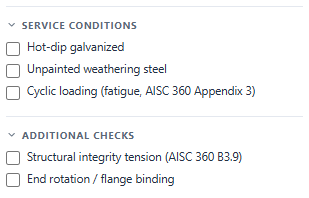
| Option | Effect |
|---|---|
| Hot-dip galvanized | Adds the galvanizing notes for copes and reentrant corners |
| Unpainted weathering steel | Adds the related detailing notes |
| Cyclic loading (fatigue, AISC 360 Appendix 3) | Designs the connection for fatigue (AISC 360-22 Appendix 3) and requires the Appendix 3 cope radius. See Fatigue (Appendix 3). |
| Structural integrity tension (AISC 360 B3.9) | Runs the structural-integrity tension check as an independent case |
| End rotation / flange binding | Checks that the beam can rotate the required amount before its flange binds on the support. Enter the Required rotation, or use the presets 0.03 or 0.025 (341). The 0.025 rad preset is for a gravity connection in a braced-frame bay (AISC 341). |
Fatigue (Appendix 3) #
Tick Cyclic loading to design the connection for fatigue by AISC 360-22 Appendix 3. These inputs appear:
| Field | Meaning |
|---|---|
| Stress-range cycles nSR (0 = indefinite life) | The number of stress-range fluctuations in the design life (Commentary Eq. C-A-3-2: cycles per day × 365 × years). 0 (default) designs for an indefinite life: the allowable range is the threshold FTH, and the root-crack categories C′ and C″, which have no threshold, use 2 × 10^8 cycles (the User Note). 20,000 cycles or fewer: no evaluation is required (Section 3.1) and the result says so. |
| Cyclic load range | Fraction of the service live load (default) or Range of shear entered. |
| Fraction of the live load that cycles | The live shear that cycles, as a fraction of RL. 1.0 (default): the full live load comes and goes; 2.0: full reversal. |
| Cyclic range of shear | The range of the required shear between its cyclic extremes, entered directly (kips or kN). |
How the stress range is found: ILX computes each detail's stress at the governing design load by elastic analysis (Section 3.2, no stress-concentration factors; weld groups by the elastic method, with the eccentricity), then multiplies it by k = range / required shear. The other load components (axial) are taken to cycle in proportion. With direct, case or ASCE 7 load input there is no service live load, so the Fraction option uses the design load as the range (k = 1, conservative) and every fatigue check says so; enter the range instead for a full check.
Each detail is a check of its own, in a Fatigue (Appendix 3) group on screen and a Fatigue (Appendix 3) table in the report's Summary of Checks: the detail, its Table A-3.1 case and stress category, the stress range fsr, the allowable range FSR and the result. A range below FTH needs no further evaluation; the calculation says so. The single plate's details:
| Detail | Table A-3.1 | Stress range from |
|---|---|---|
| Plate and beam web at the bolt holes | Case 2.1 (slip-critical, B, gross section), 2.2 (pretensioned, B, net section); snug-tight joints are not in Section 2 and are taken as Case 1.5 open holes (D), conservative | V or P over the section along the bolt line |
| Plate-to-support fillet welds | Case 8.2 (F, shear on the throat, Eq. A-3-2) | Elastic weld group, V at the bolt-group eccentricity |
| Plate at the support welds | Case 5.7: the lesser of the toe crack (C) and the root crack (C″, Eq. A-3-5 with RFIL, Eq. A-3-6) | 6 V e / (t L²) + P / (t L) |
| Plate-to-beam fillet welds (welded beam side) | Case 8.2 (F) | Elastic weld group |
| Beam at the cope corner | Case 1.3: C for R ≥ 1 in. ground or reamed (setting), E′ for R ≥ 3/8 in. | M c / I of the coped section, M = V (setback + c) |
The grinding of cope corners and the testing of CJP welds are engineer settings in Settings → Design rules (see Settings); their defaults are the Specification's conservative choices. Bolts in shear are not checked for fatigue (Section 3.4(a) checks the connected material; the Commentary notes no fatigue failures of high-strength bolts in shear splices). Not checked: the 0.66Fy limit on the peak stress (the strength checks govern), distortion-induced fatigue and corrosive or hot (over 300 °F) service. RCSC 4.2(3) requires pretensioned or slip-critical bolts in joints under fatigue load; the pretension check flags a snug-tight joint.
Auto-design, compare and batch #
Auto-design #
Auto-design searches bolt count, diameter and grade, plate thickness, weld size and the geometry, and returns the best adequate designs.
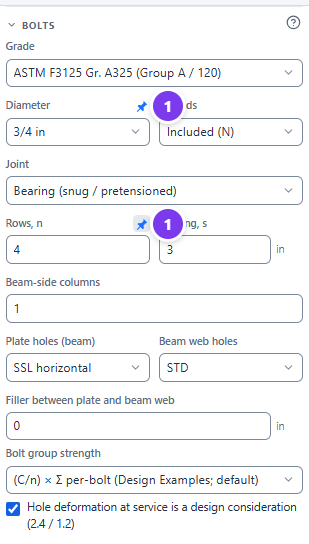
- Pin the fields you want to keep. Hover over a field label and select the pin icon. It stays blue while pinned. Pinned fields are listed in the auto-design dialog as Locked.
- Select Auto-design in the toolbar.
- Choose the Objective:
- Lightest (steel weight);
- Fewest bolts;
- Lowest cost (fabrication estimate).
- Review the candidates. Each row shows its status, ratio, governing check and the Changes from current.
- Select Apply on the design you want. The inputs change; select Undo (Ctrl+Z) to go back.
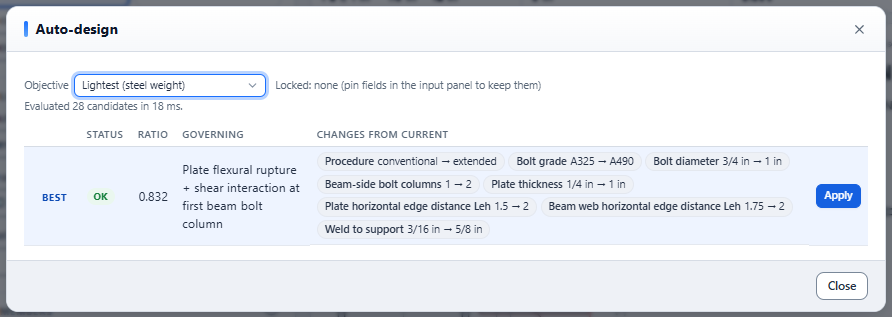
Auto-design can change the procedure (for example from conventional to extended) unless you pin Procedure. Check the changes before you apply them. To auto-design a connection as you create it, tick Auto-design the connection in the last wizard step.
Compare #
- Open two or more connections in tabs.
- Select Compare in the header.
- Pick Connection A and Connection B.
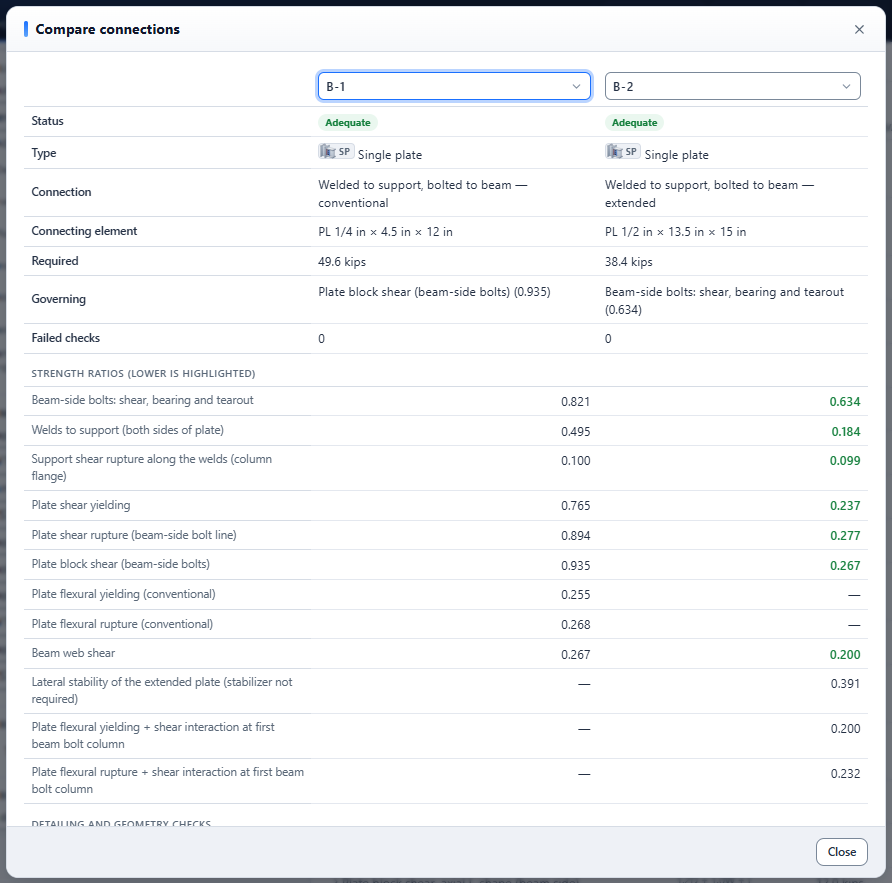
The table lists the status (Adequate, Not adequate or NOT FEASIBLE), element, required strength, governing check and number of failed checks of each connection. Then come two sections:
- Strength ratios. Every strength check side by side. The lower ratio of each pair is highlighted.
- Detailing and geometry checks. The detailing and feasibility checks that fail in either connection, as OK / NG / NOT FEASIBLE, with a count of those that pass in both.
Batch design #
Batch design runs a schedule of marks through the same base connection, and creates the connections in one step.
Open it with Batch in the header, or Batch design… in a project's menu. The base input is the open connection when it belongs to that project; otherwise it is the project defaults. The page header says which.
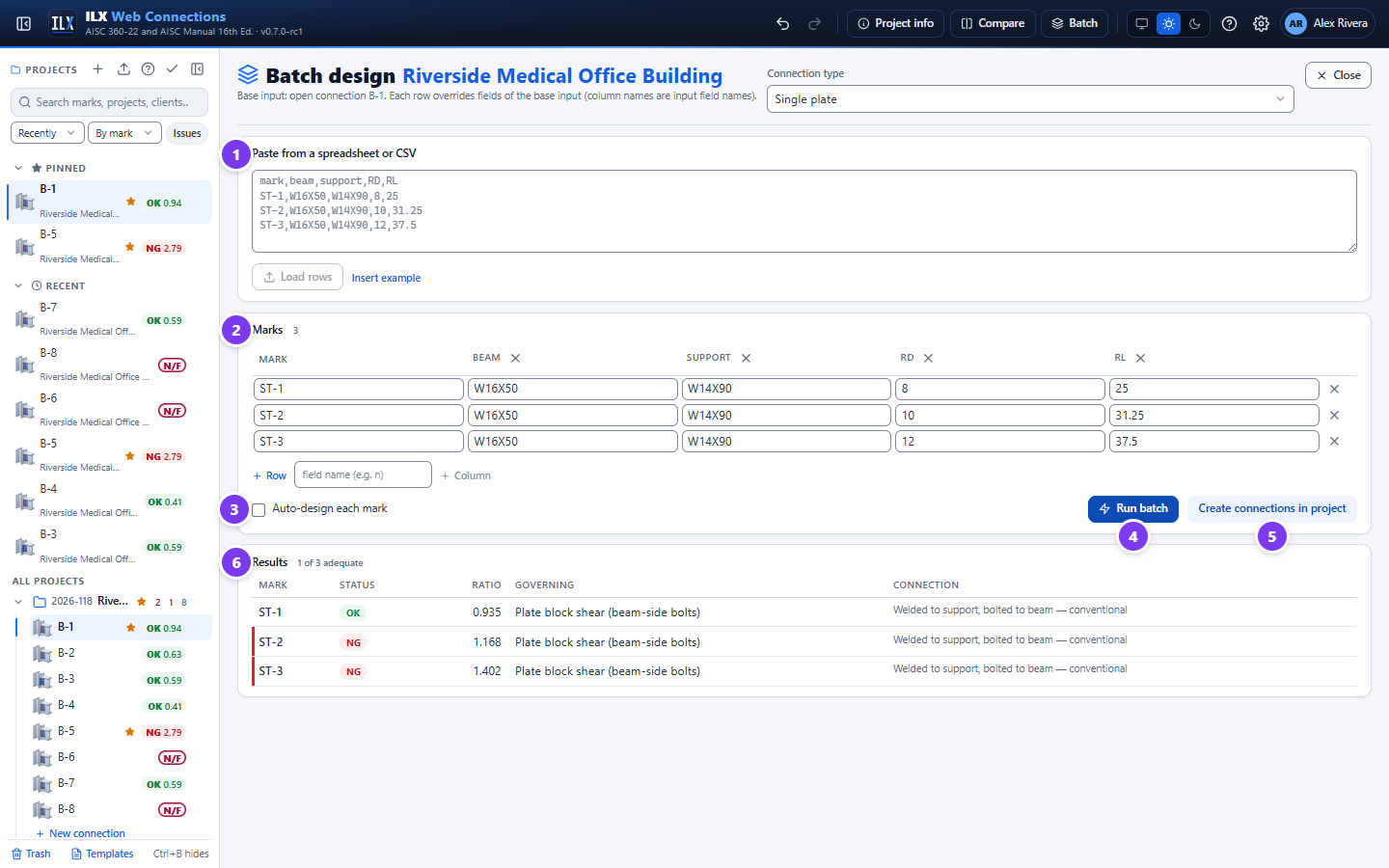
- Paste the schedule. Paste rows from a spreadsheet or CSV and select Load rows. The first row may be a header; column names are input field names, such as
mark,beam,support,RD,RL,norplate_t. Insert example shows the format. - Edit the grid. Add or remove rows, or add a column by typing a field name and selecting + Column. Invalid numbers are outlined in red. US lengths accept fractions.
- Auto-design (optional). Tick Auto-design each mark to size every mark for its own loads.
- Run batch.
- Create the connections. Select Create connections in project to add every mark to the project.
- Results. Each mark's status (OK, NG, NOT FEASIBLE or Error), ratio, governing check and connection description. Input errors and notes appear under the governing check.
Load columns and the load mode. Each load mode reads its own columns:
RD,RL(andPD,PL) for Service dead + live, the ASCE 7 components for ASCE 7 combinations, andV,Pfor Required strength. Load columns are never ignored silently:
- If a row's load columns belong to another mode than the base connection's, the row switches to that mode, and the result notes Load mode switched from Required strength to Service D + L to use column(s) RD, RL.
- If the columns mix modes (for example
VandRD), or contradict aload_modecolumn, the row is rejected with an error that names the columns.