Checks and compliance
Reading the results #
The results column reads from top to bottom: is the connection adequate, why, and what to change.
The status bar #

- Connection adequate (green), Connection not adequate (red) or Connection not feasible (rose, see NOT FEASIBLE), followed by the configuration, for example Welded to support, bolted to beam — conventional.
- The design method, the required shear V (and axial P), and the governing check with its ratio. With several load combinations, the bar adds envelope of combinations.
- The tallies:
- Strength OK, or the number of strength failures;
- Code compliant, or the number of code-compliance violations;
- the number of advisories, when there are any.
Select the compliance or advisory pill to open the Code compliance list. When the geometry is not feasible, the tallies read NOT FEASIBLE · n geometry issues and Strength not evaluated instead, and Strength OK and Code compliant are not shown.
A connection is adequate only when every strength check and every detailing (code-compliance) check passes. Recommendations never make a connection inadequate.
Below the status bar:
- Required strength: open the card to see how V and P were obtained from the loads, typeset step by step.
- Key geometry: the plate or angle size, the eccentricity used for the bolt group, the bolt coefficient C and the setback.
The governing check #
The governing check is the strength check with the highest ratio. Its ratio is the one shown in the status bar, the file tree and the report. A connection can be NG with a governing ratio below 1.0: then a detailing rule fails, not a strength check. The compliance tally tells you which.
All checks #
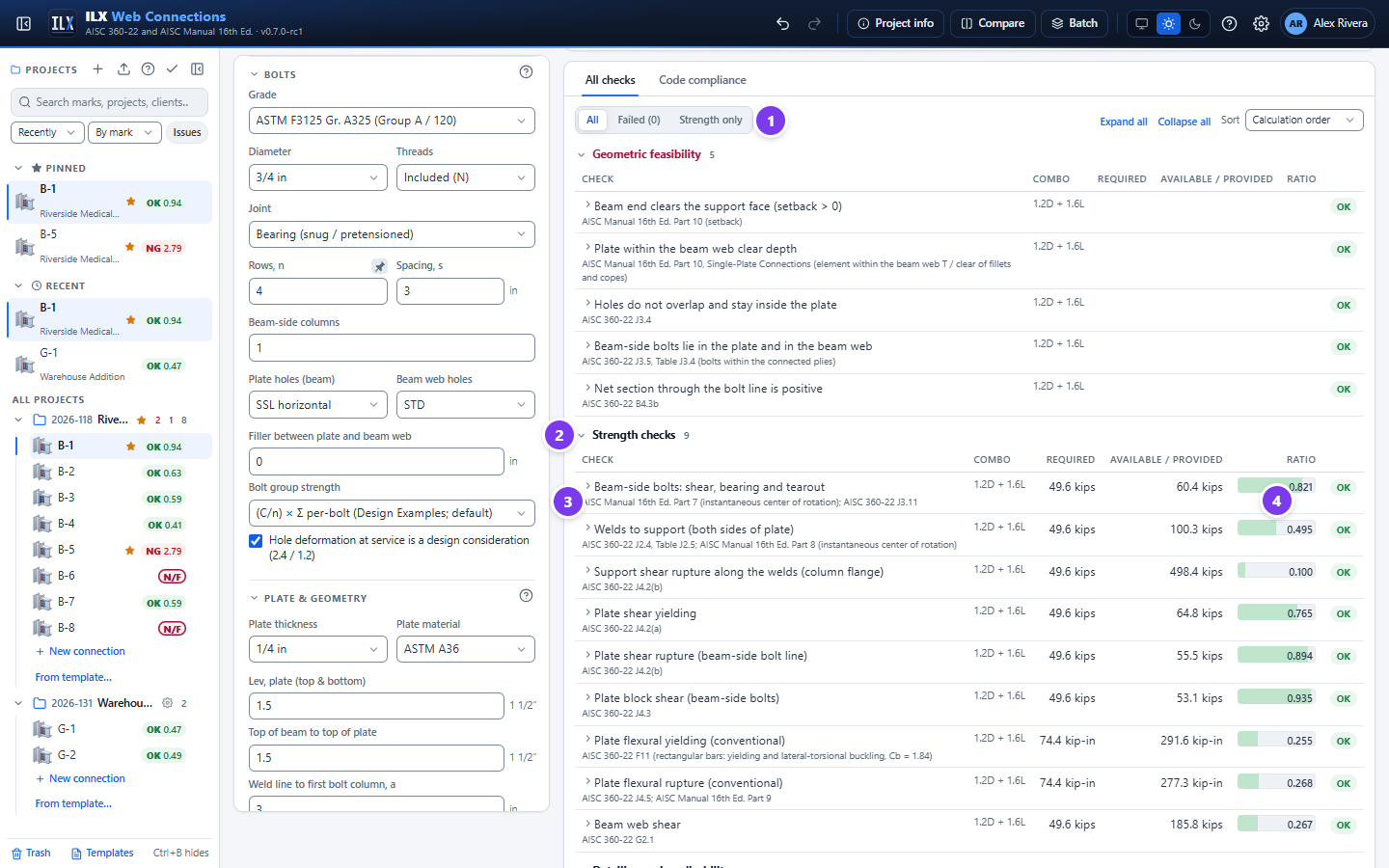
- Filter:
- All;
- Failed (n): only the failing checks;
- Strength only.
On the right, Expand all and Collapse all open or close every row, and Sort orders by Calculation order or Ratio (highest first).
- Groups. Select a group title to collapse it.
- Geometric feasibility: can it be built at all?
- Strength checks: limit states with a demand, a capacity and a ratio.
- Fatigue (Appendix 3): with Cyclic loading ticked, the stress range at each detail against its Table A-3.1 allowable range FSR; see Fatigue (Appendix 3). The report lists them in a table of their own with the stress category.
- Detailing and applicability: spacing, edge distances, hole permissions, Table 10-9 limits, weld size rules and similar.
- Recommendations: good practice that does not affect adequacy (marked Advisory).
- Clause reference. Under each title is the governing clause or Manual reference, for example AISC 360-22 J4.2(b) or AISC Manual 16th Ed. Part 7.
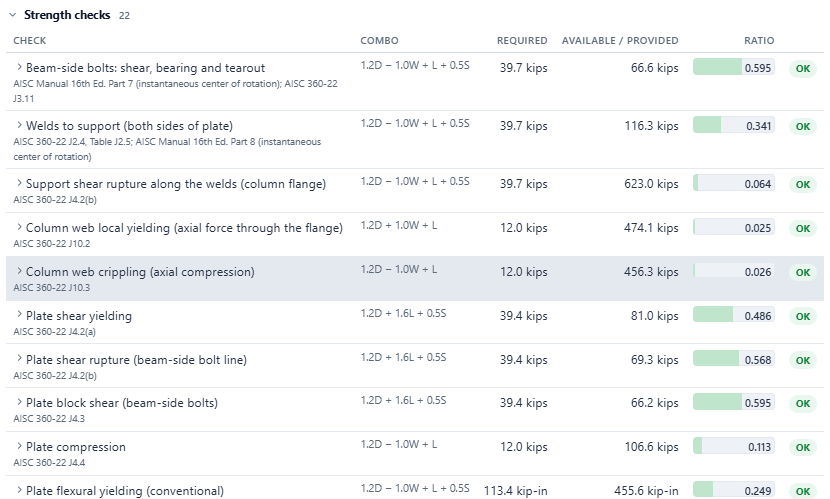
- Ratio bar: required ÷ available. A green bar is OK; red is NG.
The Combo column gives the load combination that governs each check.
Strength, geometry and recommendation #
| Category | Pass / fail means | Affects adequacy |
|---|---|---|
| Strength | Demand ≤ available strength (φRn or Rn/Ω) | Yes |
| Geometry (detailing and applicability) | A code or Manual rule is met: spacing, edge distance, hole type, tmax, weld size, procedure limits | Yes |
| Recommendation | A practice rule is met; shown as Advisory when not, for example Fy Z ≤ Fu Znet for an extended plate | No |
| Feasibility | The geometry can physically be built | Yes: see NOT FEASIBLE |
Calculation cards, clause references and fix hints #
Select a check row to open its calculation card.
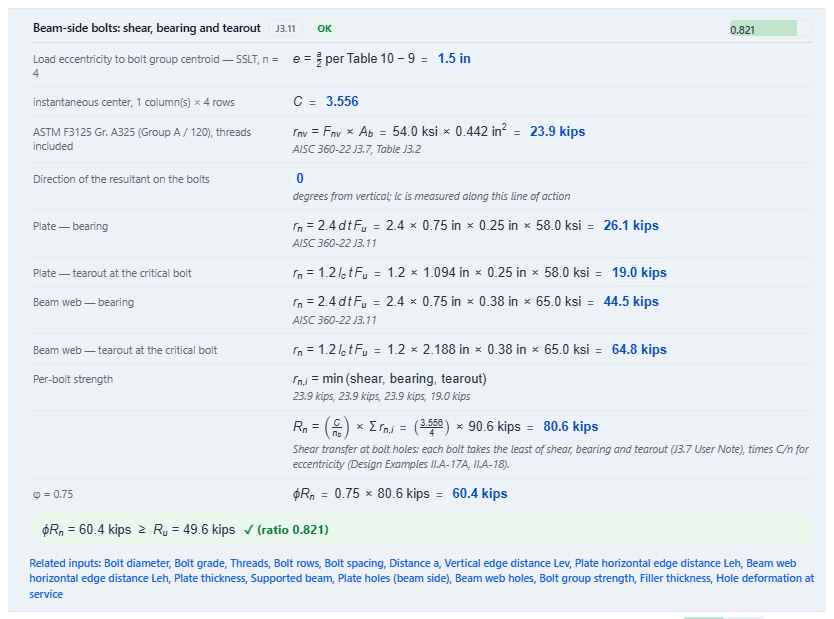
- The working. Each step gives the equation, the substituted values and the result, with the clause or table that supplies it.
- The comparison. The card ends with the code comparison, for example φRn = 60.4 kips ≥ Ru = 49.6 kips ✓, and the ratio.
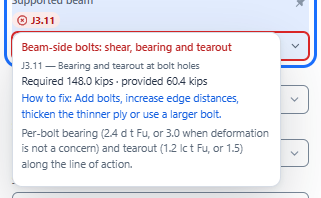
- Fix hint. A failing check adds How to fix: with the change that resolves it, for example Add bolts, increase edge distances, thicken the thinner ply or use a larger bolt.
- Related inputs. Lists, by their labels in the input panel, the fields the check depends on. Select it to jump to them.
Failing checks: from the result to the input #
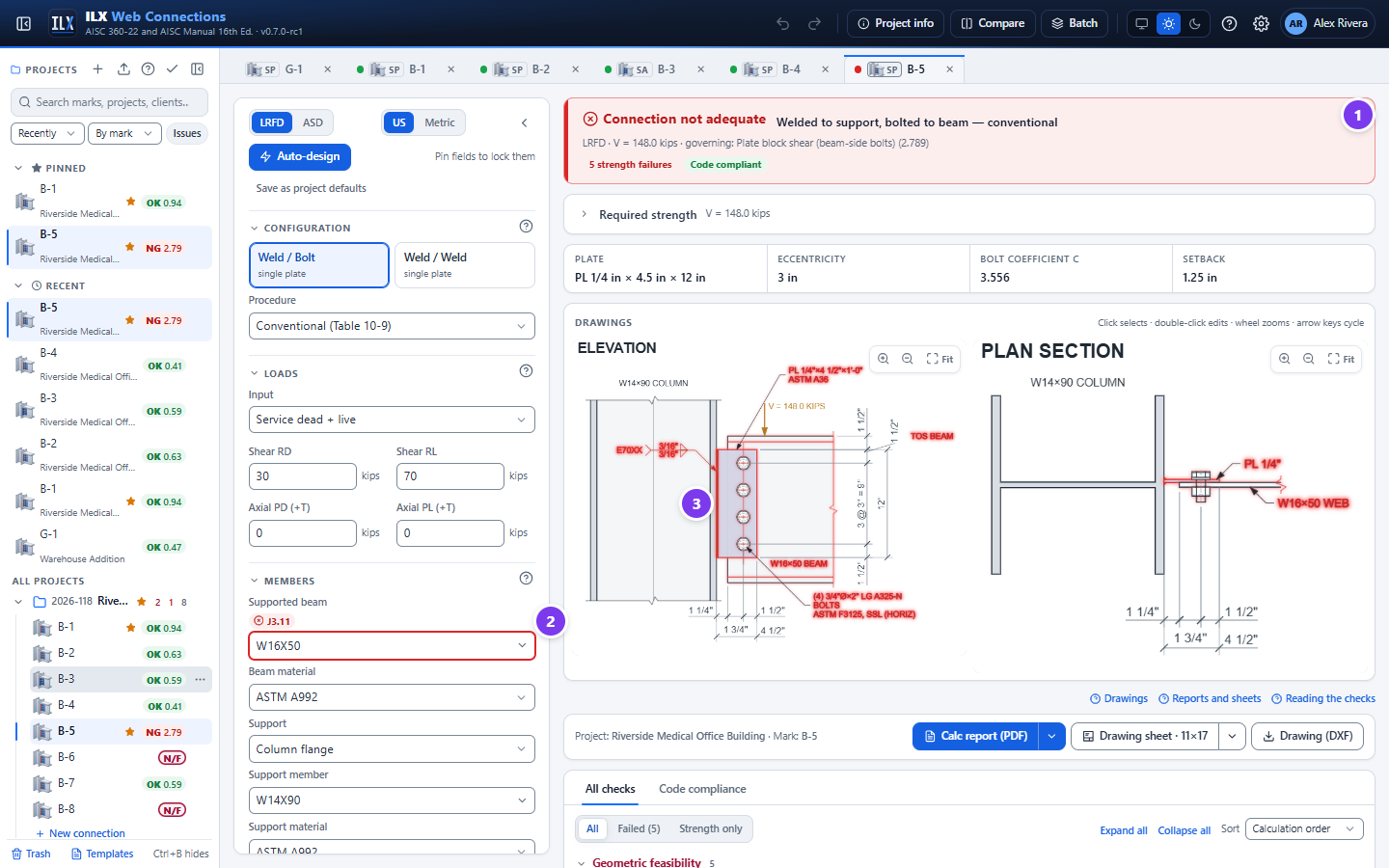
- The status bar turns red and counts the failures.
- Every input that a failing check depends on carries an issue badge with the clause, for example J3.11 +4 (this clause and four more issues).
- In the drawing, the elements of failing checks are outlined in red.
To go from a failing check to the inputs that cause it:
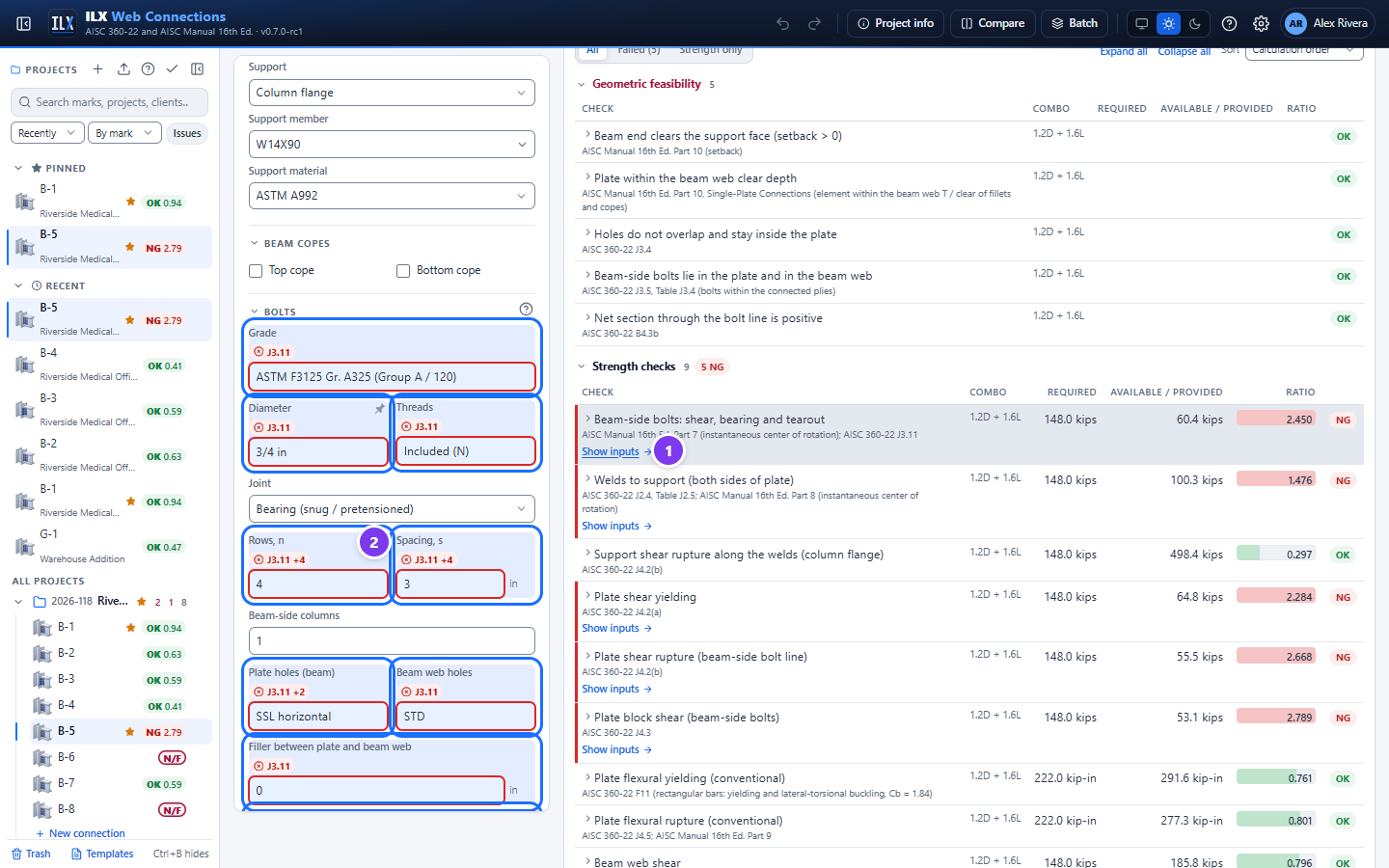
- Select Show inputs under the failing check.
- The input panel scrolls to the related fields and highlights them for a few seconds with a blue outline set outside the field and a blue tint, so the highlight also shows on fields already outlined in red. The element is also selected in the drawing.
Hover over an issue badge, or select it, to read the check without leaving the input. The popup gives the check, the clause and its title, the required and provided values, the fix hint and a one-line summary of the clause.
Code compliance #
Code compliance lists every detailing and applicability requirement, with recommendations and feasibility, grouped by topic: Bolting, Welding, Copes, Plate / angle and Geometry fit.
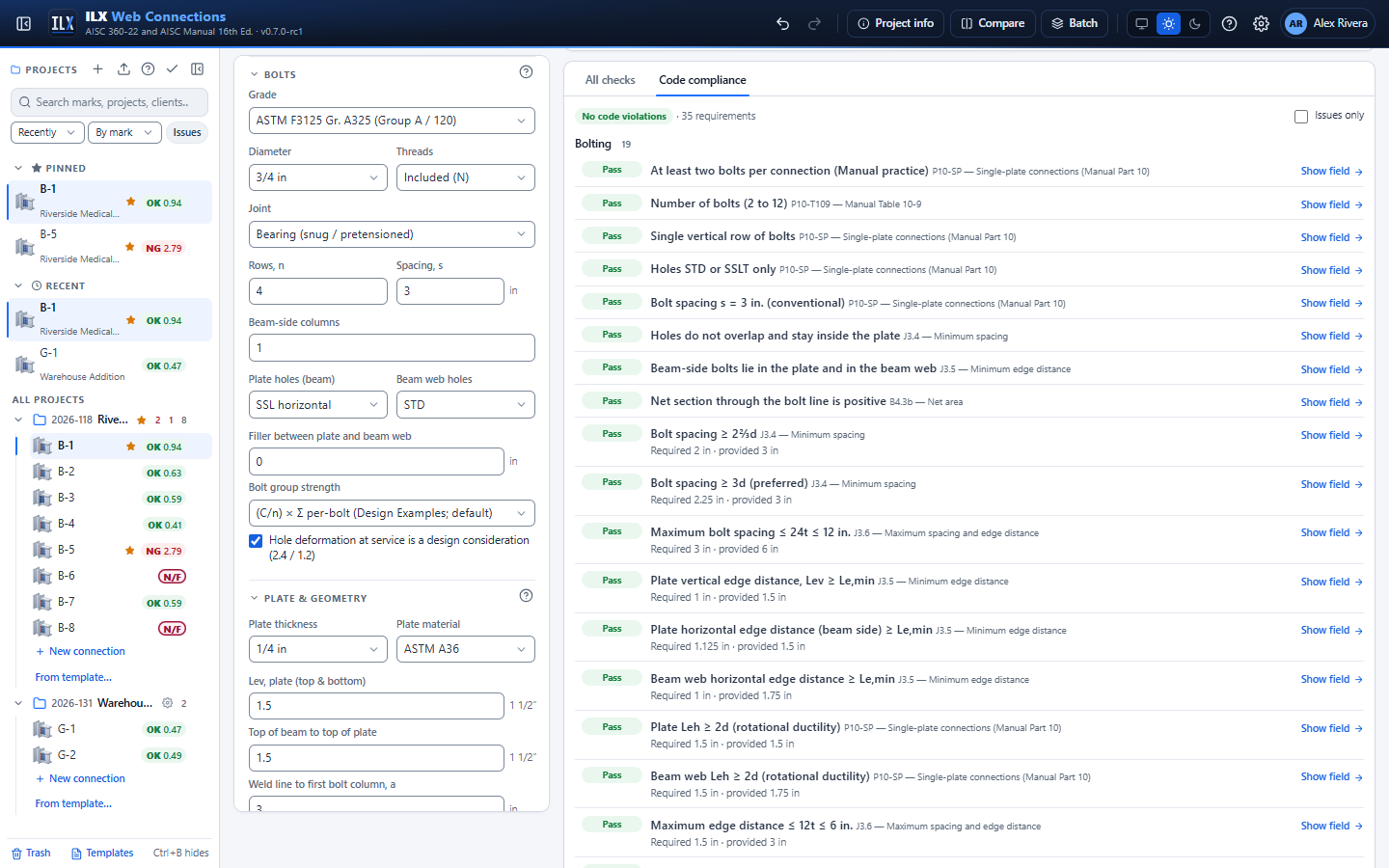
- Status. Each row is Pass, Fail or Advisory, with the clause, its title, and the required and provided values.
- Failing rows. These add the message and the fix hint.
- Show field. Jumps to the input.
- Issues only. Tick it to hide the passing requirements.
- Tab badge. The Code compliance tab shows the number of violations and advisories.
Bolt rules for every type #
Every connection type with bolts applies the same bolt rules, from AISC 360-22 J3 and the RCSC Specification (2020 by default, or 2025 as a design rule). The check, the report note, the bolt callout and the drawn bolt all come from one source, so they always agree.
- Pretension required (
pretension_req). A snug-tight joint fails in three cases: Group 150 (A490, F2280) or Group 200 (F3043) bolts carry tension or combined shear and tension, bolts in tension see cyclic load, or a joint is subject to fatigue load. AISC 360-22 J3.2(a)(2) allows snug-tight bolts in tension for Group 120 only (RCSC 4.2). The fix is Pretensioned or Slip-critical. Every type whose bolts can carry tension offers the Pretensioned joint. - Project rule (
pretension_project). When the project's design rules require pretension, every bolted joint that is not pretensioned or slip-critical fails (RCSC 4.2(1)). - Joint type on the drawing. The general notes make snug-tight the default. Pretensioned bolts are called out -PT, for example
A490-N-PT BOLTS, and slip-critical bolts SC CLASS A or SC CLASS B. - Washers (RCSC Section 6). These cover slotted outer plies of snug-tight joints (an F436 or a 5/16-in. plate washer) and oversized or slotted outer plies of pretensioned and SC joints. For those plies, Group 150 bolts over 1 in. need the 5/16-in. extra-thick F436. Long slots need a 5/16-in. plate washer or bar, or for Group 150 bolts over 1 in. a 3/8-in. plate washer or bar with an F436. Pretensioned Group 150 bolts in steel with Fy < 40 ksi get F436 washers under the head and the nut. Sloped faces (S, C and MC flanges) get beveled washers. Group 200 assemblies take the washers of their ASTM standard. The drawing shows a head washer wherever the list needs one.
- Group 200 sizes (
group_c_size). F3043 / F3111 bolts come only in 1, 1-1/8 and 1-1/4 in. (Table J3.1). The diameter lists offer only those sizes, and auto-design never proposes others. - Galvanized (
bolt_galvanized). Galvanized Group 150 and Group 200 bolts fail (RCSC 2.8.1; RCSC covers Groups 120, 144 and 150, and Group 200 follows its ASTM standard). Galvanized Group 120 bolts get the assembly note: a matched, lubricated and rotation-capacity-tested assembly with overtapped DH nuts, never reused. - Threads excluded (
threads_x…). With Excluded (X), ILX takes the bolt length the drawing uses, the thread length (ASME B18.2.6) plus the run-out, and the ply stack. The check fails when the threads reach a shear plane. The hint offers threads included (N, 26 % less shear strength), a reversed bolt, or a longer bolt with extra washers. - Fillers (J5.2). Fillers thicker than 1/4 in. reduce bolt shear by 1 − 0.4(t − 0.25), not below 0.85, where t is the total filler thickness. Slip-critical joints get the reduction in their bearing-type check too (J3.9), unless the fillers are developed.
- Long bolts. For a pretensioned bolt longer than 12d, a note says the turn-of-nut rotation must be found by test (RCSC Table 8.1).
Clause labels such as P10-SP (single-plate practice, Manual Part 10) or P10-T109 (Table 10-9) refer to the Manual. Labels such as J3.4 or B4.3b refer to AISC 360-22. The glossary lists the short labels.
NOT FEASIBLE #
ILX tests the geometry before it trusts any strength result. If any part cannot physically be built, the connection is NOT FEASIBLE, whatever its strength. Examples:
- a bolt outside a ply, or beyond the beam end;
- a plate deeper than the beam web's clear depth;
- a plate beyond the support face;
- the beam clashing with the support.
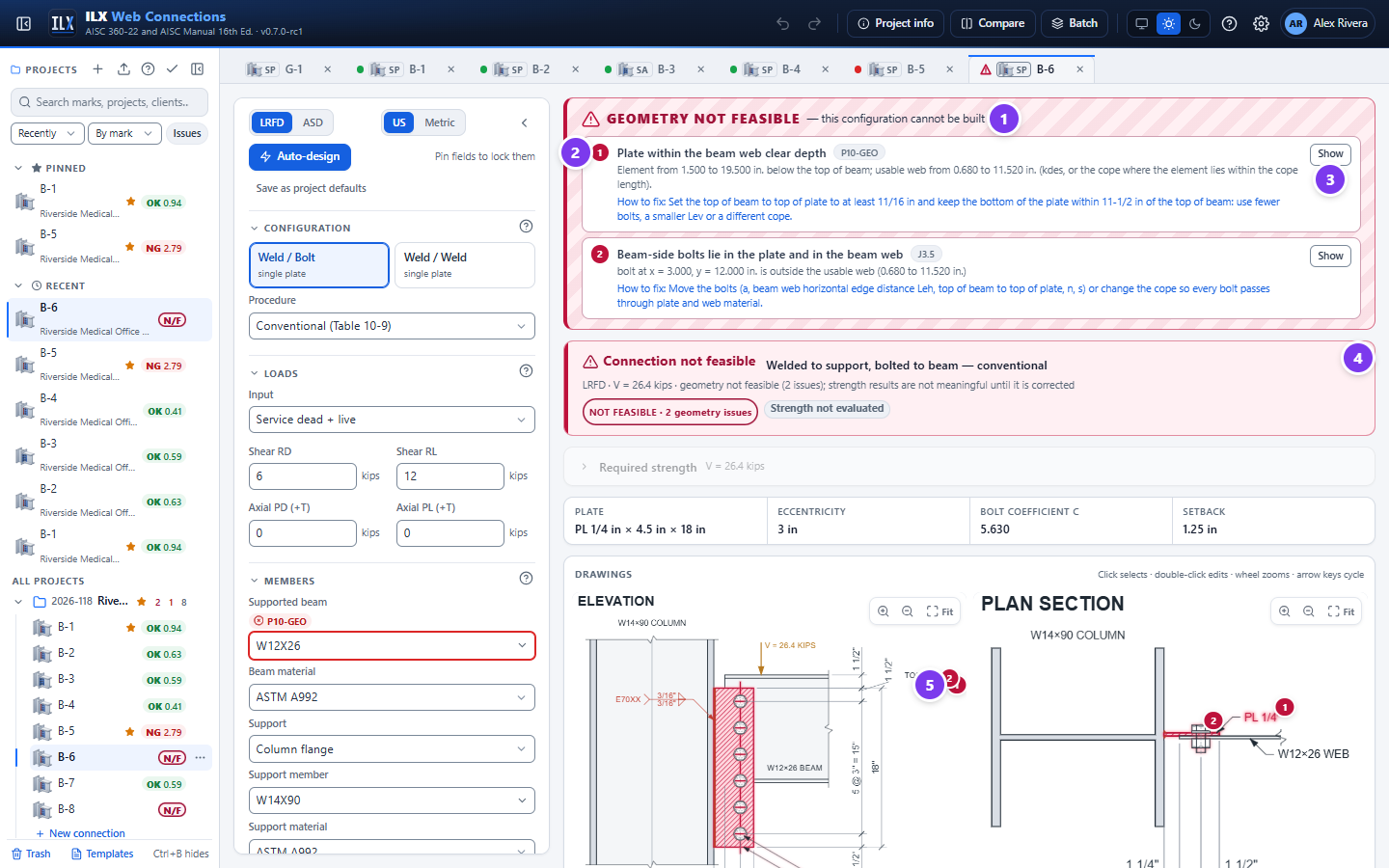
- The banner. A red banner, GEOMETRY NOT FEASIBLE — this configuration cannot be built, replaces the usual first line.
- Numbered items. Each problem is numbered and gives the title, a clause label, the measured values and How to fix:.
- Show. Selects the element in the drawing and jumps to its inputs.
- Status bar. It reads Connection not feasible, with the number of geometry issues and strength results are not meaningful until it is corrected. The pills show NOT FEASIBLE and Strength not evaluated; the strength results below are greyed out.
- Markers. The same numbers mark the offending elements on the drawings, which are hatched in red.
In the project panel and the tabs the connection shows N/F and a warning triangle. Auto-design, batch and Compare show NOT FEASIBLE, never NG or Not adequate. The same status rule is used everywhere, including the report.
Suggested fixes #
For some problems ILX can compute the fix itself. Examples are the cope a beam needs to clear a girder flange, or the weld size the 5/8 tp rule requires. These appear as Suggested fixes under the status bar.
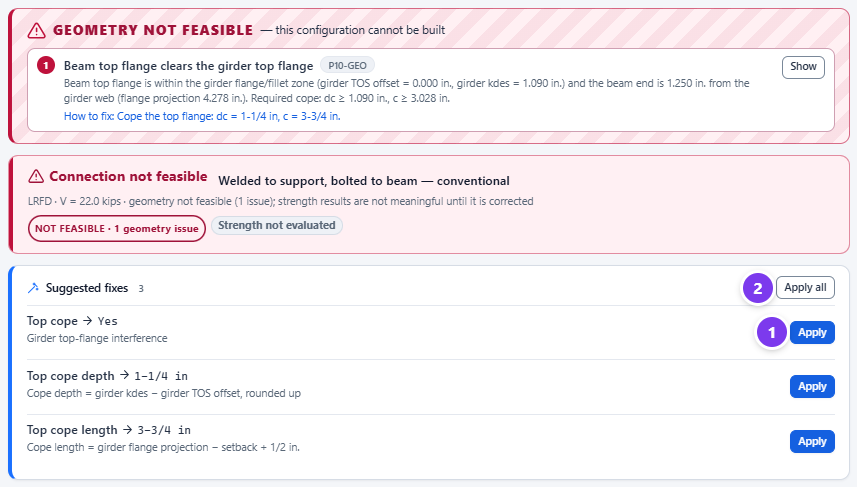
- Select Apply on one suggestion. The value is entered, and the field is highlighted in the input panel.
- Select Apply all to apply every suggestion at once.
Each suggestion names the input by its label and shows the value with its unit, for example Top cope → Yes and Top cope depth → 1-1/4 in. It gives its reason, for example Cope depth = girder kdes − girder TOS offset, rounded up. Undo (Ctrl+Z) reverses an applied suggestion.
Load combinations in the results #
With Service components → ASCE 7 combinations or a Factored load cases table, ILX designs the connection for each combination and reports the envelope.
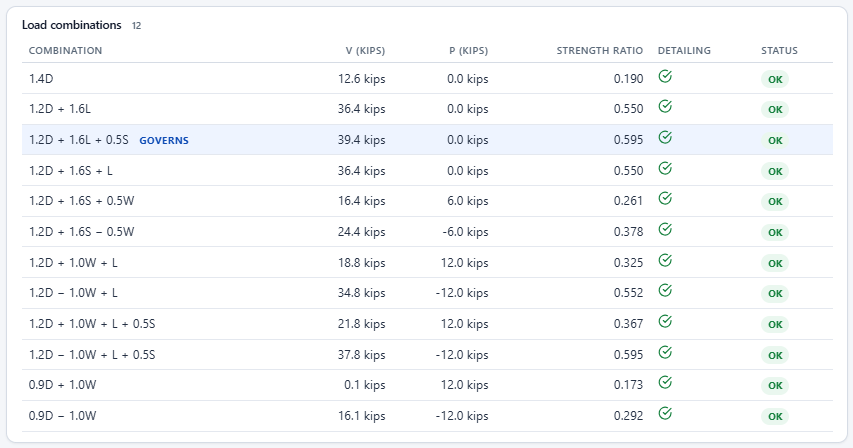
- The table. The Load combinations table lists each combination with its V, P and Strength ratio, the governing strength ratio of that combination. The combination with the highest ratio is tagged governs.
- The Detailing column. A check mark when every detailing (geometry) check passes in that combination, or a cross with the number of failing detailing checks. Hover over it for their names. Detailing checks can depend on the load, for example the slip-critical requirement once an axial load is present.
- The Status column. OK, NG when a strength check fails, or NG (detailing) when the strength is adequate but a detailing check fails. A row reading NG (detailing) can therefore have a strength ratio below 1.0.
- The Combo column. In All checks, it gives the combination that governs each check, so different checks can be governed by different combinations.